DigitalOcean · Opus 5.5 · medium effort · HIPAA organization · trial 1
Data / Visualization App on DigitalOcean
Success
Deployed to https://adb-wqhai-dataviz-ja39g.ondigitalocean.app. Every deployment is deleted after it's verified and reviewed.
Screenshots
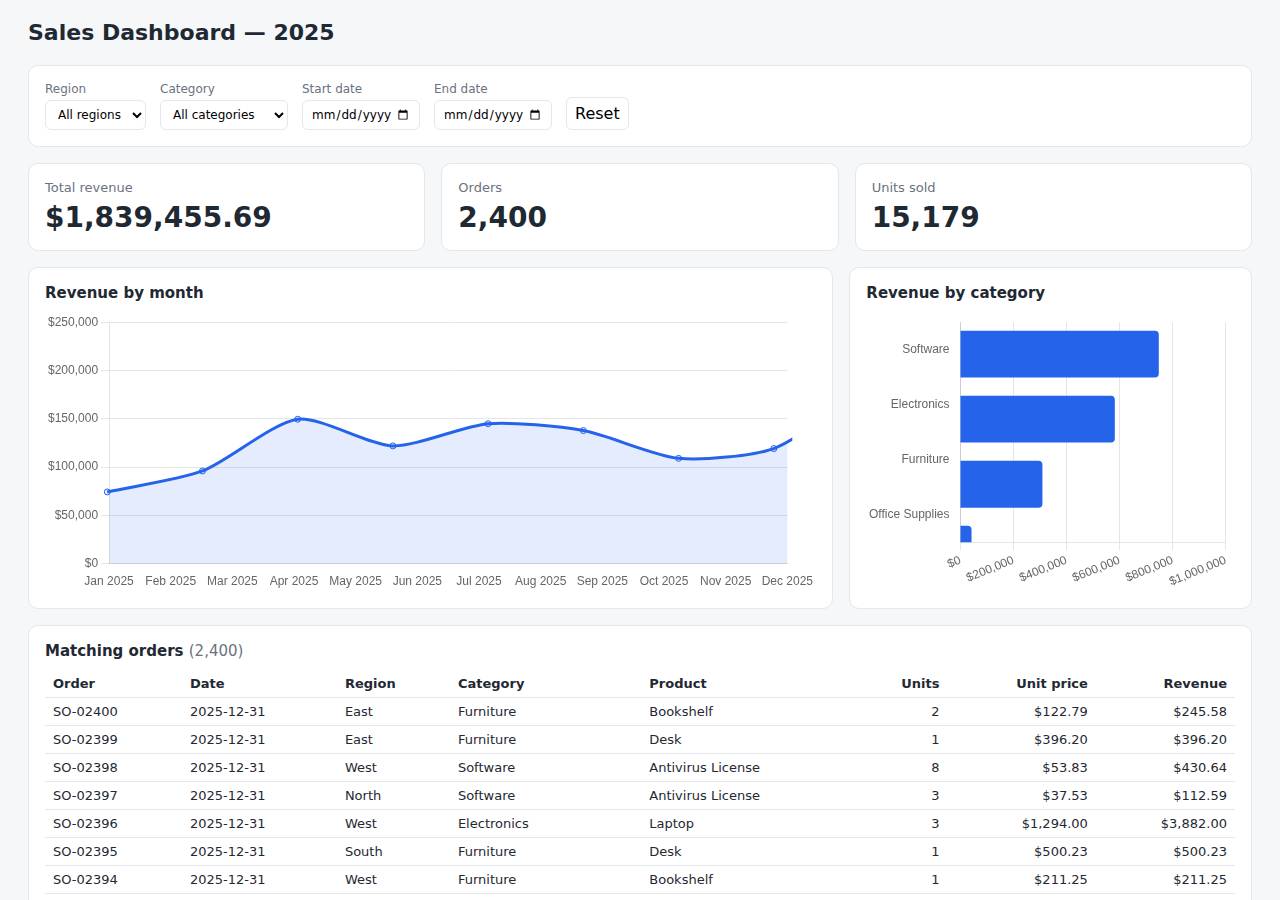
Technologies
- Runtime
- Node.js 22
- Frameworks
- Node.js http module (built in)
- Packaging
- Docker (node:22-alpine)App spec (app.yaml)
- Hosting
- App Platform service (apps-s-1vcpu-0.5gb)DigitalOcean Container Registry (starter)
Named from the app's dependencies, Dockerfile and config files, and the cloud resources it created.
Checks
Black-box checks against the live URL. A cell succeeds when every required check passes. The app's spec
| Result | Check | Details |
|---|---|---|
| passed | GET / answers 2xx within 1 min ready |
|
| passed | The app is served over HTTPS with a valid certificate https |
|
| passed | The app is public: no redirect to another host such as a login page public_access |
|
| passed | GET / serves the dashboard as HTML dashboard |
|
| passed | GET /api/summary (no filters) matches the dataset summary_all |
|
| passed | GET /api/summary (region=West) matches the dataset summary_region |
|
| passed | GET /api/summary (category=Electronics) matches the dataset summary_category |
|
| passed | GET /api/summary (region=East, category=Furniture, start=2025-03-01, end=2025-06-30) matches the dataset summary_combined |
|
| passed | GET /api/summary (region=Atlantis) matches the dataset summary_empty |
|
| passed | The dashboard renders a chart (SVG or canvas) in a browser browser_chart |
|
| passed | The dashboard shows at least two charts browser_two_charts optional |
|
| passed | The dashboard has filter controls browser_filters optional |
Human steps
- Sign up for an account and verify the email address · 3 min
prerequisite: account setup - Add a payment method to the account · 2 min
prerequisite: account setup - Create an API token and hand it to the agent · 2 min
prerequisite: account setup
Security & compliance review
An independent Claude Code session reviewed the source, the agent's sessions and the live deployment against a fixed rubric (claude-opus-5-5, high effort).
This small, dependency-free Node.js dashboard runs as a non-root container on a paid, always-on DigitalOcean App Platform instance, which suits commercial use. It handles no secrets, exposes no files beyond the app, and redirects HTTP to HTTPS with a valid certificate. The weaknesses are mostly in provenance: a base image with no digest, a mutable v1 image tag, doctl installed without a checksum check, and a CDN script with no SRI. The app also sends none of the standard security headers.
| Criterion | Weight | Score | Why |
|---|---|---|---|
| Secrets handling | 25 | 10/10 | The app needs no secrets. The DigitalOcean token was only used through the $DIGITALOCEAN_ACCESS_TOKEN environment variable and doctl's credential helper, and never got into source, the image, the logs or the deployed files. |
| Deployment provenance | 20 | 6/10 | The image was built locally from the reviewed source and pushed to a registry the owner controls. But the base image is a floating tag with no digest, the deployed image tag v1 is mutable, doctl was downloaded with no checksum check, and Chart.js loads from a CDN without Subresource Integrity. |
| Terms compliance | 15 | 10/10 | This is a commercial app on a paid App Platform Basic instance, which is always on and doesn't sleep. DigitalOcean's standard terms allow business use, and the DOCR starter tier is a supported free tier with no expiry. |
| Least privilege | 15 | 9/10 | There is a single public web service and no database. The container runs as the non-root node user and the data is read-only inside the image. The only minor gap is that the spec doesn't make the read-only intent explicit, and that has little effect here. |
| Transport security | 10 | 7/10 | HTTP redirects to HTTPS with a 301 and the certificate is valid (Google Trust Services, expires Dec 2026). The app sets none of HSTS, X-Content-Type-Options, X-Frame-Options/frame-ancestors or CSP, even though its own send() helper could easily add them. |
| Attack surface | 10 | 10/10 | Probes for .env, .git/config, package.json, source files, the CSV, the Dockerfile and app.yaml all return a JSON 404. Errors are generic JSON with no stack traces, and the only extra endpoints are the harmless /health and /api/options. |
| Application security | 5 | 8/10 | Date parameters are checked against a regex, limit and page are clamped (limit at most 500), non-GET methods get a 405, and the orders table escapes every string field. The app has no rate limiting of its own; for public read-only aggregate data that is a minor gap, partly covered by the platform's Cloudflare edge. |
Findings
-
medium deployment Base image not pinned by digest
Evidence: app/Dockerfile:1 `FROM node:22-alpine` (floating tag, no @sha256 digest)
Fix: Pin the base image to a specific version and digest, e.g. node:22.x-alpine3.xx@sha256:..., and update it on purpose.
-
low deployment Deployed image referenced by mutable tag
Evidence: app/app.yaml:7 `tag: v1`; process/resources.json shows spec image tag v1, with no digest, although the push printed sha256:624826e5...
Fix: Use unique immutable tags (e.g. the git SHA) or deploy by digest, so a re-push can't silently change what runs.
-
low deployment doctl binary downloaded without checksum verification
Evidence: process/deploy.md: `curl -sL https://github.com/digitalocean/doctl/releases/download/v1.115.0/doctl-1.115.0-linux-amd64.tar.gz | tar xz && sudo mv doctl /usr/local/bin/` (version pinned, but there is no sha256 check)
Fix: Check the release checksum file before installing, or use a trusted package source.
-
low app Third-party CDN script loaded without Subresource Integrity
Evidence: app/public/index.html:7 `<script src="https://cdn.jsdelivr.net/npm/chart.js@4.4.4/dist/chart.umd.min.js"></script>` with no integrity or crossorigin attribute
Fix: Add an integrity hash and crossorigin="anonymous", or bundle Chart.js and serve it from the app.
-
low app Security headers missing
Evidence: curl -sI https://adb-wqhai-dataviz-ja39g.ondigitalocean.app/ returns only content-type, cache-control and Cloudflare/DO headers, with no Strict-Transport-Security, X-Content-Type-Options, X-Frame-Options or Content-Security-Policy; app/src/server.js:15 sets only Content-Type and Cache-Control
Fix: Add HSTS, X-Content-Type-Options: nosniff, a CSP with frame-ancestors 'none' (allowing cdn.jsdelivr.net for scripts) and X-Frame-Options: DENY in send().
-
info app No application-level rate limiting on public API
Evidence: app/src/server.js:31-60 has no throttling; every /api/orders request filters and sorts all 2,400 rows
Fix: Fine for this dataset size. Add basic per-IP rate limiting, or rely on and configure edge protections, if the data or traffic grows.
-
info app Input validation and output escaping are in place
Evidence: GET /api/summary?start=bad -> 400 {"error":"start must be YYYY-MM-DD"}; GET /api/orders?limit=99999&page=-5 -> 200 with limit 500, page 1; POST /api/summary -> 405; index.html:109-112 escapes fields with esc()
Fix: No action needed.
Cloud resources and cost
| Traffic | Per month | How it was priced |
|---|---|---|
| Light use Barely used: a few visits a week, about 2,000 requests a month. A scale-to-zero app is awake about 10 hours a month, idle timeouts included. | $5.00 | fixed monthly prices; 0.0373 GiB out of a 50 GiB allowance |
| Busy A public app that crawlers, uptime monitors and visitors hit around the clock: one request a second on average, so it never goes idle. | $5.00 | fixed monthly prices; 49 GiB out of a 50 GiB allowance |
Resources the agent created
| Kind | Name | Plan | List price / month | Pricing |
|---|---|---|---|---|
| app | adb-wqhai-dataviz | adb-wqhai-dataviz-web: apps-s-1vcpu-0.5gb x 1 | $5.00 | adb-wqhai-dataviz-web: apps-s-1vcpu-0.5gb x 1 |
| registry | adb-wqhai-dataviz | starter | $0.00 | Container Registry starter tier (one per account) |
The agent estimated $5.00 a month.
Code
- Code
- 309 lines in 11 files (JavaScript 155, HTML 144, JSON 24, YAML 16, Docker 10, Markdown 8)
- Dependencies
- 0 npm, 0 Python
- Deploy config
Dockerfile.dockerignoreapp.yaml
The agent's sessions
| Phase | Status | Time | Turns | Tokens | Cost | Shell commands |
|---|---|---|---|---|---|---|
| Build | completed | 1m 42s | 9 | 335.3K | $0.35 | 8 |
| Deploy | completed | 1m 45s | 10 | 446.5K | $0.19 | 9 |
The agent's deploy summary
The dashboard is live over HTTPS at https://adb-wqhai-dataviz-ja39g.ondigitalocean.app. Every API requirement checked out through that public URL. I didn't open the page in a browser, so the charts and filters in the actual page are untested.
What I deployed:
- Container registry
adb-wqhai-dataviz, on the free starter tier. It holds the app's Docker image,adb-wqhai-dataviz-web:v1. - App Platform app
adb-wqhai-datavizwith one web service,adb-wqhai-dataviz-web. It runs on the smallest basic instance (1 vCPU, 0.5 GB) in the NYC region. HTTPS comes from DigitalOcean's defaultondigitalocean.appaddress, and it uses/healthas its health check. - Cost: about $5/month in total; the registry is free.
What I tested through the public URL:
GET /returns 200 and the dashboard page./api/summarywith no filters returns all 2,400 orders, 15,179 units and $1,839,455.69 in revenue, the same totals as locally.- With region, category and date filters all set, the API returns only orders matching all of them.
- With no matches, it returns zeros and empty arrays.
/api/ordersreturns the filtered orders, newest first.- The Chart.js file the page loads from the jsDelivr CDN is reachable.
Live test suite: I changed the tests so they can run against the live site with BASE_URL=<url> npm test. The first run had one failure that I didn't capture. Three runs straight after that all passed, so it was probably a one-off on a newly started instance, but I don't know the cause.
Other notes:
- The order data is built into the image, so there's no database.
- The deployment settings are in
app.yaml. To redeploy, push a new image tag to the registry and pointapp.yamlat it. - No step needed a person, and I didn't create any credentials, so
.envis empty. I added it to.gitignoreand.dockerignoreanyway. - Everything is recorded in
deployment.json.
9 shell commands during deploy
- 4s
which doctl; doctl version 2>/dev/null; curl -s -H "Authorization: Bearer $DIGITALOCEAN_ACCESS_TOKEN" https://api.digitalocean.com/v2/registry | head -c 400; echo; curl -s -H "Authorization: Bearer $D - 8s
cd /tmp && curl -sL https://github.com/digitalocean/doctl/releases/download/v1.115.0/doctl-1.115.0-linux-amd64.tar.gz | tar xz && sudo mv doctl /usr/local/bin/ && doctl version && doctl registry creat - 24s
cd /home/runner/work/_temp/adb-wqhai-dataviz; doctl registry login >/dev/null 2>&1 && docker build -q --platform linux/amd64 -t registry.digitalocean.com/adb-wqhai-dataviz/adb-wqhai-dataviz-web:v1 . & - 1m 08s
doctl apps list --format ID,Spec.Name,DefaultIngress,ActiveDeployment.Phase,InProgressDeployment.Phase - 1m 11s
doctl apps list -o json | python3 -c "import json,sys; [print(a['id'],a['spec']['name'],a.get('default_ingress'),a.get('active_deployment',{}).get('phase'),a.get('tier_slug')) for a in json.load(sys.s - 1m 16s
U=https://adb-wqhai-dataviz-ja39g.ondigitalocean.app - 1m 20s
cd /home/runner/work/_temp/adb-wqhai-dataviz; BASE_URL=https://adb-wqhai-dataviz-ja39g.ondigitalocean.app npm test 2>&1 | grep -A12 "failing tests" - 1m 23s
cd /home/runner/work/_temp/adb-wqhai-dataviz; for i in 1 2 3; do BASE_URL=https://adb-wqhai-dataviz-ja39g.ondigitalocean.app npm test 2>&1 | grep -E "^ℹ fail|^✖|error" | head -5; done - 1m 34s
cd /home/runner/work/_temp/adb-wqhai-dataviz; echo ".env" >> .gitignore; echo ".env" >> .dockerignore
Raw data
Report on GitHub Full record (JSON) Workflow run, with transcripts