Vercel · Opus 5.5 · medium effort · HIPAA organization · trial 1
Data / Visualization App on Vercel
Success
Deployed to https://adb-vwbea-dataviz-web.vercel.app. Every deployment is deleted after it's verified and reviewed.
Screenshots
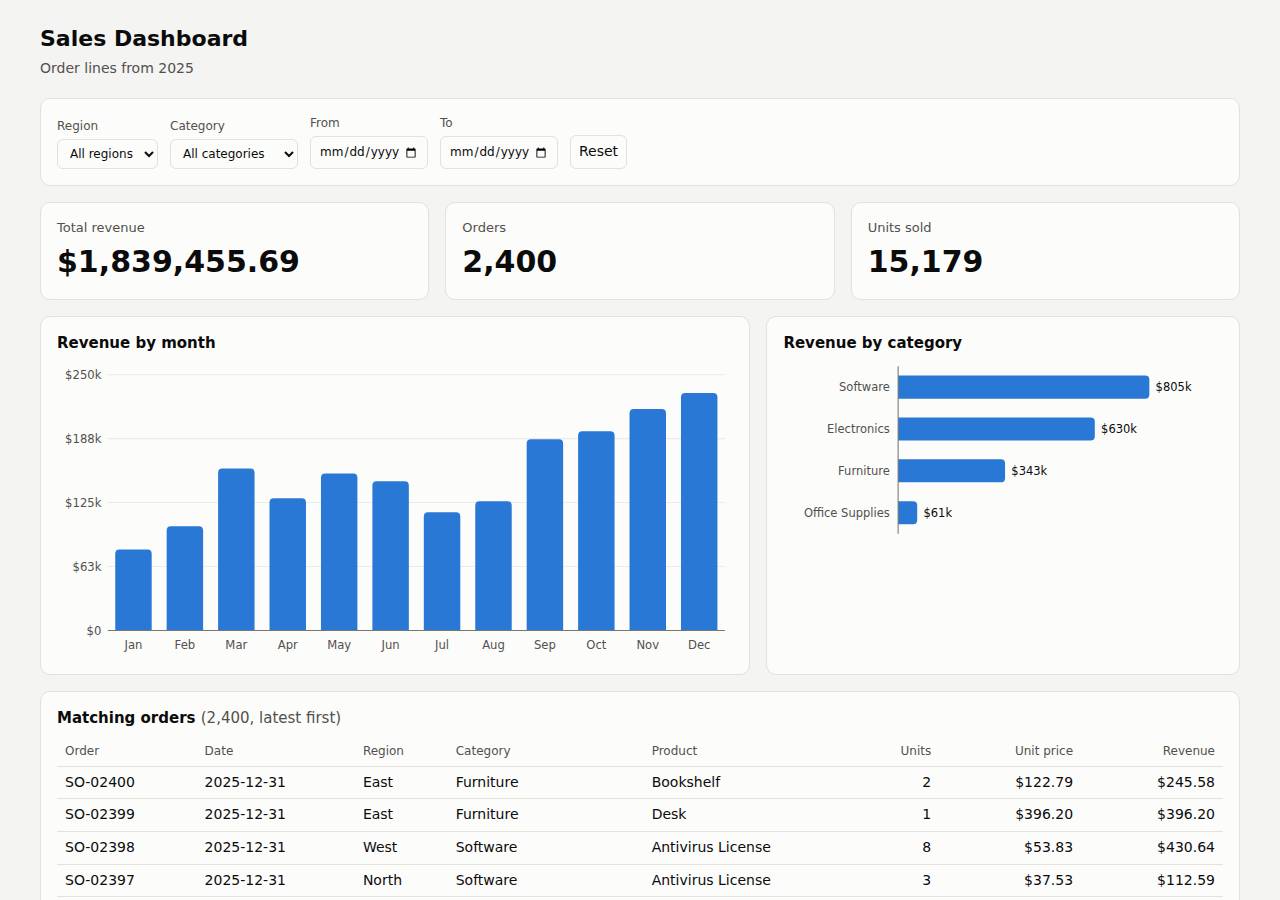
Technologies
- Runtime
- Node.js 18+
- Frameworks
- Plain Vercel Functions
- Packaging
- vercel.json
- Hosting
- Vercel project (node)Vercel Functions
Named from the app's dependencies, Dockerfile and config files, and the cloud resources it created.
Checks
Black-box checks against the live URL. A cell succeeds when every required check passes. The app's spec
| Result | Check | Details |
|---|---|---|
| passed | GET / answers 2xx within 1 min ready |
|
| passed | The app is served over HTTPS with a valid certificate https |
|
| passed | The app is public: no redirect to another host such as a login page public_access |
|
| passed | GET / serves the dashboard as HTML dashboard |
|
| passed | GET /api/summary (no filters) matches the dataset summary_all |
|
| passed | GET /api/summary (region=West) matches the dataset summary_region |
|
| passed | GET /api/summary (category=Electronics) matches the dataset summary_category |
|
| passed | GET /api/summary (region=East, category=Furniture, start=2025-03-01, end=2025-06-30) matches the dataset summary_combined |
|
| passed | GET /api/summary (region=Atlantis) matches the dataset summary_empty |
|
| passed | The dashboard renders a chart (SVG or canvas) in a browser browser_chart |
|
| passed | The dashboard shows at least two charts browser_two_charts optional |
|
| passed | The dashboard has filter controls browser_filters optional |
Human steps
- Sign up for an account and verify the email address · 3 min
prerequisite: account setup - Create an API token and hand it to the agent · 2 min
prerequisite: account setup
Security & compliance review
An independent Claude Code session reviewed the source, the agent's sessions and the live deployment against a fixed rubric (claude-opus-5-5, high effort).
The deployment is technically clean: no secrets needed or leaked, no dependencies, nothing exposed beyond the app, HTTPS with HSTS enforced, preview URLs protected, and well-validated, XSS-safe app code. The main problem is compliance: this is a commercial app, but it runs on a Vercel Hobby team, and Hobby terms restrict use to non-commercial projects. Smaller gaps are unpinned deploy tooling (vercel@latest, Node >=18), deploying from the local workspace instead of a git repository, and missing CSP/nosniff/frame headers that vercel.json could have set.
| Criterion | Weight | Score | Why |
|---|---|---|---|
| Secrets handling | 25 | 9/10 | The app needs no secrets and none are in source or deployed files. The Vercel token came from an environment variable and never appeared in output, and the CLI-generated .env.local was added to .vercelignore. The only small issue is that the token was passed as a --token command-line argument. |
| Deployment provenance | 20 | 7/10 | The app has no dependencies or build step, and the deployed files are the reviewed source, deployed straight from the agent's workspace. Build inputs are loosely pinned, though: the deploy used `npx -y vercel@latest` and the Node runtime is only `>=18`, and there is no git-backed deploy linking production to a controlled repository. |
| Terms compliance | 15 | 2/10 | process/context.json says this is a commercial app, but the team is on Vercel's Hobby plan. Vercel's Hobby terms limit that plan to personal, non-commercial use. The agent recorded 'Hobby/free-tier usage' without flagging the conflict or recommending Pro. |
| Least privilege | 15 | 10/10 | The deployment has no database, storage or extra resources, just stateless serverless functions reading a bundled read-only CSV. Only the production alias is public; per-deployment URLs stay behind Vercel Authentication (302 on probe). |
| Transport security | 10 | 8/10 | Only HTTPS is served: HTTP gets a 308 redirect, and the platform sends HSTS with preload. CSP, X-Content-Type-Options and frame-protection headers are missing, and the agent could have set them in vercel.json. |
| Attack surface | 10 | 10/10 | Requests for source files, vercel.json, package.json, .env, .env.local, .git/config, .vercel/project.json, data/sales.csv and test files all return 404. Errors are generic JSON with no stack traces, and there are no debug endpoints. |
| Application security | 5 | 9/10 | Dates are strictly validated (400 on bad input), only GET/HEAD are allowed, page_size is clamped to 1-200, and the client escapes API data before using innerHTML. There is no rate limiting on the public API, which matters little for read-only aggregate data. |
Findings
-
high deployment Commercial app hosted on Vercel Hobby (non-commercial) plan
Evidence: process/context.json: "use": "commercial", team_plans: {"team_U2tHOV4fpUx18nl9EpcRQ4hO": "hobby"}; process/deployment.json plan: "Team's existing plan (Hobby/free-tier usage)", monthly_cost_usd 0. Vercel's Hobby plan terms/fair-use policy restrict it to personal, non-commercial use.
Fix: Move the project to a Vercel Pro (or Enterprise) team before using it for the business, or tell the owner that an upgrade is required. Budget for the cost instead of reporting $0.
-
low deployment Unpinned deploy tooling and runtime
Evidence: process/deploy.md: `npx -y vercel@latest --version` (resolved 64.0.2) then `npx vercel deploy --prod`; app/package.json: "engines": { "node": ">=18" }
Fix: Pin the Vercel CLI version (e.g. `npx vercel@64.0.2`) and pin a Node major (e.g. "20.x") in engines or project settings. Consider git-integrated deploys from a repository the owner controls.
-
low deployment Production deployed from local workspace rather than a tracked repository
Evidence: process/deploy.md: `npx vercel deploy --prod --yes` run from the working directory; no git repository or commit reference recorded
Fix: Connect the Vercel project to the owner's git repository so every production deployment traces back to a commit.
-
low app Missing CSP, X-Content-Type-Options and frame-protection headers
Evidence: curl -sI https://adb-vwbea-dataviz-web.vercel.app/ shows only cache-control, content-type, server, strict-transport-security; app/vercel.json has no `headers` block
Fix: Add a `headers` section to vercel.json setting Content-Security-Policy (e.g. default-src 'self'; frame-ancestors 'none'), X-Content-Type-Options: nosniff and Referrer-Policy.
-
info deployment Vercel token passed as command-line argument
Evidence: process/deploy.md: `npx vercel link ... --token "$VERCEL_TOKEN"` and `npx vercel deploy --prod ... --token "$VERCEL_TOKEN"`. Output was not echoed and shows no token, but the expanded value is visible in the process list during execution.
Fix: Rely on the VERCEL_TOKEN environment variable, which the CLI reads directly, rather than passing --token on the command line.
-
info app No rate limiting on public API endpoints
Evidence: app/lib/handlers.js: summaryHandler/ordersHandler have no throttling; GET /api/orders?page_size=100000 returns page_size 200 (clamped), so the whole dataset is retrievable in 12 requests
Fix: If abuse becomes a concern, enable Vercel Firewall rate-limiting rules or add edge caching (Cache-Control s-maxage) for the deterministic summary responses.
-
info deployment No source or config files exposed
Evidence: GET /.env, /.env.local, /.git/config, /vercel.json, /package.json, /server.js, /lib/sales.js, /data/sales.csv, /.vercel/project.json, /test/api.test.js all returned 404 (9 bytes)
Fix: None required.
Cloud resources and cost
| Traffic | Per month | How it was priced |
|---|---|---|
| Light use Barely used: a few visits a week, about 2,000 requests a month. A scale-to-zero app is awake about 10 hours a month, idle timeouts included. | $20.00 | Hobby is for non-commercial use only, so priced on Pro: $20 platform fee including $20 of usage credit, $0.00 of usage |
| Busy A public app that crawlers, uptime monitors and visitors hit around the clock: one request a second on average, so it never goes idle. | $20.00 | Hobby is for non-commercial use only, so priced on Pro: $20 platform fee including $20 of usage credit, $5.75 of usage |
Resources the agent created
| Kind | Name | Plan | List price / month | Pricing |
|---|---|---|---|---|
| project | adb-vwbea-dataviz-web | $0.00 | no fixed fee; usage within the plan's included allowance |
The agent estimated $0.00 a month.
Code
- Code
- 467 lines in 14 files (HTML 263, JavaScript 204, JSON 26, Markdown 9)
- Dependencies
- 0 npm, 0 Python
- Deploy config
vercel.json
The agent's sessions
| Phase | Status | Time | Turns | Tokens | Cost | Shell commands |
|---|---|---|---|---|---|---|
| Build | completed | 2m 21s | 15 | 614.0K | $0.57 | 10 |
| Deploy | completed | 1m 21s | 7 | 402.1K | $0.15 | 6 |
The agent's deploy summary
The dashboard is live at https://adb-vwbea-dataviz-web.vercel.app, and everything in TASK.md worked when I tested it through that URL.
What's deployed: one Vercel project, adb-vwbea-dataviz-web. Vercel serves the dashboard page and runs the API endpoints as serverless functions. There's no database: the CSV file is packaged with the functions and read into memory. Expected cost is $0/month.
What I checked through the public URL:
- Dashboard (
/): returns 200. In a headless browser, choosing Furniture changed total revenue from $1,839,455.69 to $342,694.31 without a page reload. The category chart redrew to a single bar, the table showed 50 rows, and there were no page errors. - Unfiltered summary:
/api/summaryreturns 2,400 orders, 15,179 units and $1,839,455.69 in revenue, matching what I got locally. - Combined filters: region, category and a date range together give the expected subset, for example North + Software in June 2025 gives 11 orders and $12,566.26.
- No matches: a filter that matches nothing returns zeros and empty lists.
- Helper endpoints:
/api/orders(the paginated table) and/api/meta(the filter options) both respond correctly.
Things to know:
- Only the main URL above is public. The URL for each individual deployment (ending in
-ai-deploy-bench.vercel.app) requires a Vercel login, because that's the team's default protection setting. I left that setting alone. - Linking the project made the Vercel CLI create a
.env.localfile. It's listed in.gitignoreand.vercelignore, so it isn't committed or deployed. - I didn't create any credentials, so there's no
.env, and nothing needs a person (human_stepsis empty). The details are indeployment.json.
6 shell commands during deploy
- 4s
printf '.env\nnode_modules\n.vercel\ntest\nREADME.md\ndeployment.json\n' > .vercelignore && npx -y vercel@latest --version 2>&1 | tail -1 && npx vercel link --yes --project adb-vwbea-dataviz-web --sco - 33s
echo ".env.local" >> .vercelignore && cat .vercel/project.json; echo; npx vercel deploy --prod --yes --scope "$VERCEL_TEAM_ID" --token "$VERCEL_TOKEN" 2>&1 | tail -5 - 46s
npx vercel deploy --prod --yes --scope "$VERCEL_TEAM_ID" --token "$VERCEL_TOKEN" 2>&1 | grep -v -i token | tail -40 - 1m 00s
U=https://adb-vwbea-dataviz-web.vercel.app; curl -s -o /dev/null -w "%{http_code}\n" $U/; curl -s $U/api/summary | head -c 300; echo; curl -s "$U/api/summary?region=North&category=Software&start=2025- - 1m 05s
mkdir -p /tmp/shot2 && cd /tmp/shot2 && npm init -y >/dev/null && npm i playwright@1 >/dev/null 2>&1 && npx playwright install chromium >/dev/null 2>&1; cat > s.js <<'EOF' - 1m 14s
cat > deployment.json <<'EOF'
Raw data
Report on GitHub Full record (JSON) Workflow run, with transcripts