DigitalOcean · Opus 5.5 · medium effort · HIPAA organization · trial 1
Data / Visualization App on DigitalOcean
Success
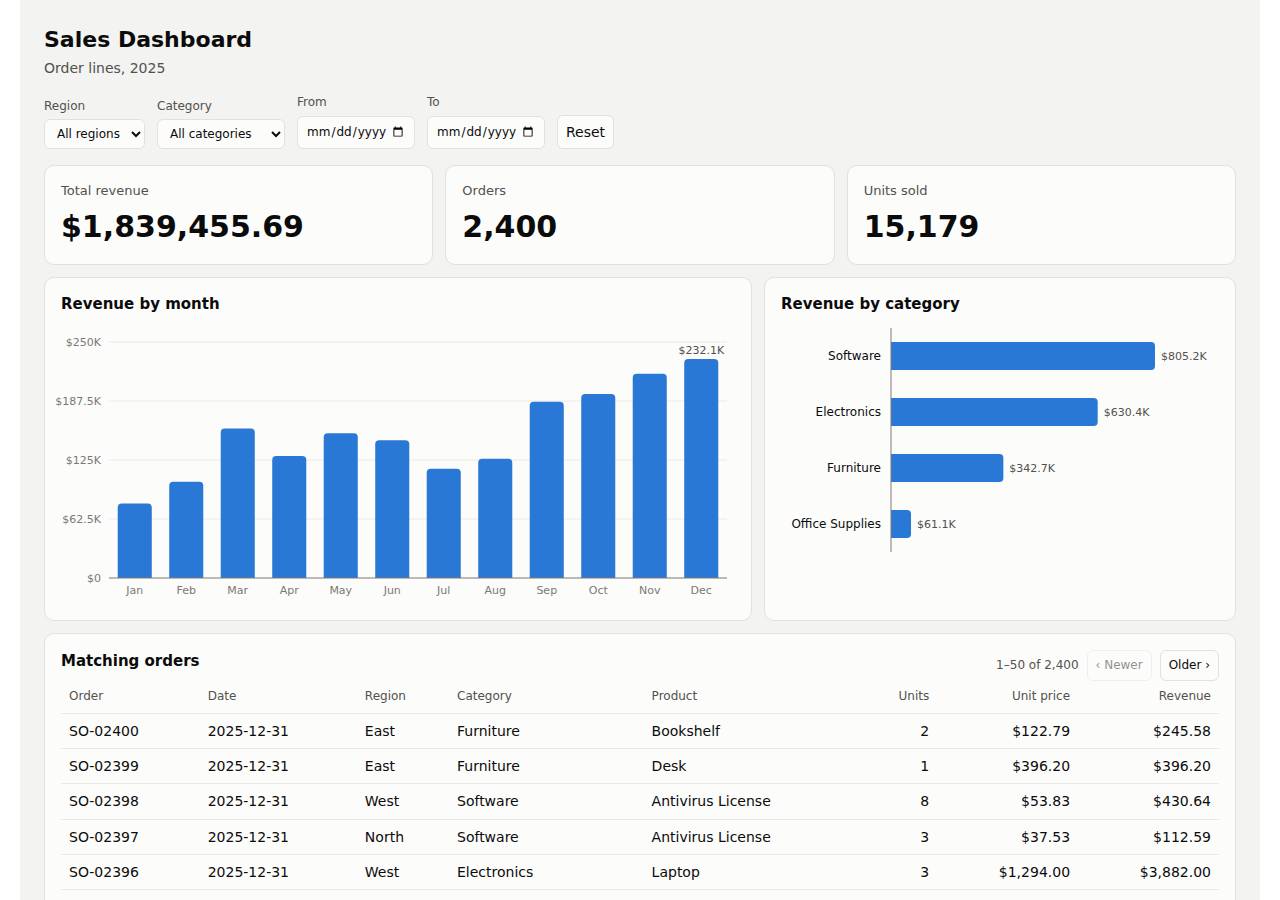
Deployed to https://adb-xhiyb-dataviz-islzi.ondigitalocean.app. Every deployment is deleted after it's verified and reviewed.
Screenshots
Technologies
- Runtime
- Node.js 22
- Frameworks
- Express
- Packaging
- Docker (node:22-alpine)App spec (app.yaml)
- Hosting
- App Platform service (apps-s-1vcpu-0.5gb)DigitalOcean Container Registry (starter)
Named from the app's dependencies, Dockerfile and config files, and the cloud resources it created.
Checks
Black-box checks against the live URL. A cell succeeds when every required check passes. The app's spec
| Result | Check | Details |
|---|---|---|
| passed | GET / answers 2xx within 1 min ready |
|
| passed | The app is served over HTTPS with a valid certificate https |
|
| passed | The app is public: no redirect to another host such as a login page public_access |
|
| passed | GET / serves the dashboard as HTML dashboard |
|
| passed | GET /api/summary (no filters) matches the dataset summary_all |
|
| passed | GET /api/summary (region=West) matches the dataset summary_region |
|
| passed | GET /api/summary (category=Electronics) matches the dataset summary_category |
|
| passed | GET /api/summary (region=East, category=Furniture, start=2025-03-01, end=2025-06-30) matches the dataset summary_combined |
|
| passed | GET /api/summary (region=Atlantis) matches the dataset summary_empty |
|
| passed | The dashboard renders a chart (SVG or canvas) in a browser browser_chart |
|
| passed | The dashboard shows at least two charts browser_two_charts optional |
|
| passed | The dashboard has filter controls browser_filters optional |
Human steps
- Sign up for an account and verify the email address · 3 min
prerequisite: account setup - Add a payment method to the account · 2 min
prerequisite: account setup - Create an API token and hand it to the agent · 2 min
prerequisite: account setup
Security & compliance review
An independent Claude Code session reviewed the source, the agent's sessions and the live deployment against a fixed rubric (claude-opus-5-5, high effort).
The dashboard is a small, read-only Express app running as a non-root container on a paid DigitalOcean App Platform instance with a private registry. It needs no secrets, exposes no files, validates and escapes input, and serves HTTPS with an HTTP redirect. The main weaknesses are provenance (a locally built image from unversioned source, deployed by mutable tag on an unpinned base image) and missing security headers.
| Criterion | Weight | Score | Why |
|---|---|---|---|
| Secrets handling | 25 | 10/10 | The app needs no secrets. The DigitalOcean token was only read from $DIGITALOCEAN_ACCESS_TOKEN in commands and never printed or written to files. No .env or credentials are in the source or the image. |
| Deployment provenance | 20 | 6/10 | The image was built from a local working directory with no source control, pushed under the mutable tag v1, and deployed by tag rather than digest. The base image node:22-alpine isn't pinned to a digest, and doctl was downloaded without checksum verification. On the plus side, dependencies are locked with package-lock.json and installed with npm ci, and the registry is private and owned by the account. |
| Terms compliance | 15 | 9/10 | This is a commercial app on a paid App Platform Basic instance ($5/mo, always on, doesn't sleep) with a private DOCR Starter registry. As far as I know, DigitalOcean's standard terms allow commercial use on both. The account plan wasn't readable, so this rests on the standard terms. |
| Least privilege | 15 | 9/10 | The container runs as the non-root node user. There's no data store, and the only public resource is the App Platform service. The registry is private. One minor point: COPY . . puts unneeded files (tests, README, TASK.md, app.yaml) into the image. |
| Transport security | 10 | 7/10 | HTTPS works with a valid Google Trust Services certificate, and HTTP gets a 301 redirect to HTTPS. However, no security headers are sent (HSTS, X-Content-Type-Options, frame protection, CSP), and the app could easily have set them. |
| Attack surface | 10 | 9/10 | Only public/ is served. Probes for .env, .git, server.js, package.json, Dockerfile, app.yaml and data/ all returned the app's JSON 404, and nothing returned a stack trace. The only minor leaks are the X-Powered-By: Express header and a /health endpoint that reports the row count. |
| Application security | 5 | 9/10 | The app is read-only over in-memory data with no injection surface. Dates are strictly validated, limit and offset are clamped (1-500), and the client HTML-escapes every data value before using innerHTML. There's no app-level rate limiting, but endpoints are cheap and sit behind DO's Cloudflare edge. |
Findings
-
medium deployment Image built from an unversioned local workspace and deployed by mutable tag
Evidence: process/deploy.md: `docker build ... -t registry.digitalocean.com/adb-xhiyb-dataviz/adb-xhiyb-dataviz-web:v1 . && docker push`; app/app.yaml and process/resources.json reference `tag: v1` with no digest. There is no git repository or commit tying the image to source.
Fix: Build from a committed source revision, preferably in CI or with App Platform building from the repo. Tag images with the commit SHA and deploy by immutable digest.
-
low deployment Base image not pinned to a digest
Evidence: app/Dockerfile:1 `FROM node:22-alpine`
Fix: Pin the base image, e.g. `FROM node:22-alpine@sha256:<digest>`, and update it deliberately.
-
low deployment doctl installed without checksum verification
Evidence: process/deploy.md: `curl -sL https://github.com/digitalocean/doctl/releases/download/v1.146.0/doctl-1.146.0-linux-amd64.tar.gz | tar xz && sudo mv doctl /usr/local/bin/`
Fix: Verify the release against its published checksums file before installing.
-
low app No security headers
Evidence: `curl -sI https://adb-xhiyb-dataviz-islzi.ondigitalocean.app/` and `/api/summary` return no Strict-Transport-Security, X-Content-Type-Options, X-Frame-Options/frame-ancestors or Content-Security-Policy.
Fix: Add helmet (or set the headers manually) in server.js, including HSTS, nosniff, frame-ancestors 'none' and a restrictive CSP (the app uses only same-origin scripts).
-
info app Framework disclosed via X-Powered-By
Evidence: Response header `x-powered-by: Express` on GET /
Fix: Call `app.disable('x-powered-by')` in server.js.
-
info deployment Unneeded files copied into the runtime image
Evidence: app/Dockerfile:6 `COPY . .` with app/.dockerignore excluding only node_modules, .git and npm-debug.log, so test/, README.md, TASK.md, Dockerfile, app.yaml and deployment.json ship in the image. They aren't served over HTTP.
Fix: Copy only server.js, data.js, data/ and public/, or extend .dockerignore.
-
info deployment 30-day registry credential left on the build host
Evidence: process/deploy.md: `doctl registry login` reports 'Login valid for 30 days'.
Fix: Use `--expiry-seconds` for a short-lived login, or run `docker logout registry.digitalocean.com` after pushing.
-
info app Non-string filter values silently ignored
Evidence: GET /api/summary?region[a]=1 returns the full unfiltered summary (200); app/data.js parseFilters drops non-string values.
Fix: Return 400 for malformed filter parameters so clients aren't misled. This doesn't affect security.
Cloud resources and cost
| Traffic | Per month | How it was priced |
|---|---|---|
| Light use Barely used: a few visits a week, about 2,000 requests a month. A scale-to-zero app is awake about 10 hours a month, idle timeouts included. | $5.00 | fixed monthly prices; 0.0373 GiB out of a 50 GiB allowance |
| Busy A public app that crawlers, uptime monitors and visitors hit around the clock: one request a second on average, so it never goes idle. | $5.00 | fixed monthly prices; 49 GiB out of a 50 GiB allowance |
Resources the agent created
| Kind | Name | Plan | List price / month | Pricing |
|---|---|---|---|---|
| app | adb-xhiyb-dataviz | adb-xhiyb-dataviz-web: apps-s-1vcpu-0.5gb x 1 | $5.00 | adb-xhiyb-dataviz-web: apps-s-1vcpu-0.5gb x 1 |
| registry | adb-xhiyb-dataviz | starter | $0.00 | Container Registry starter tier (one per account) |
The agent estimated $5.00 a month.
Code
- Code
- 481 lines in 13 files (JavaScript 346, CSS 68, HTML 58, JSON 24, YAML 16, Markdown 14, Docker 9)
- Dependencies
- 1 npm, 0 Python
- Deploy config
Dockerfile.dockerignoreapp.yaml
The agent's sessions
| Phase | Status | Time | Turns | Tokens | Cost | Shell commands |
|---|---|---|---|---|---|---|
| Build | completed | 2m 38s | 16 | 594.0K | $0.56 | 11 |
| Deploy | completed | 1m 47s | 12 | 659.1K | $0.25 | 10 |
The agent's deploy summary
The dashboard is live at https://adb-xhiyb-dataviz-islzi.ondigitalocean.app, and every requirement in TASK.md works through that URL. Nothing needed a person, so human_steps is empty.
What I set up:
- Container Registry
adb-xhiyb-dataviz, on the free Starter plan. I built the Docker image here and pushed it there asadb-xhiyb-dataviz-web:v1. - App Platform app
adb-xhiyb-dataviz, which runs that image as the serviceadb-xhiyb-dataviz-web. It uses the smallest size (apps-s-1vcpu-0.5gb, one instance) in New York. App Platform provides HTTPS and redirects HTTP to HTTPS. The app's settings are saved inapp.yaml. - Cost: about $5 a month, all for the app; the registry is free. There's no database, because the CSV is bundled with the app and kept in memory.
What I tested through the public URL:
GET /loads the dashboard./api/summarywith no filters gives 2,400 orders, $1,839,455.69 revenue and 15,179 units, the same as locally.- Combining all four filters (region, category, start and end date) returns the right subset.
- A filter that matches nothing returns zeros and empty arrays.
- The orders table paginates.
- A screenshot of the live page with a category filter applied shows the totals, both charts and the table updated.
Two things to know:
- The app went into the account's default project,
first-project, because I didn't create a new one. - Redeploying means pushing a new image tag, updating it in
app.yaml, then runningdoctl apps update 0bec4800-69f9-4923-955d-cc9a43080566 --spec app.yaml.
I created no credentials, so there's no .env, and no secrets were printed or written to files.
10 shell commands during deploy
- 6s
which doctl; doctl version 2>/dev/null; curl -s -H "Authorization: Bearer $DIGITALOCEAN_ACCESS_TOKEN" https://api.digitalocean.com/v2/registry; echo; curl -s -H "Authorization: Bearer $DIGITALOCEAN_AC - 10s
cd /tmp && curl -sL https://github.com/digitalocean/doctl/releases/download/v1.146.0/doctl-1.146.0-linux-amd64.tar.gz | tar xz && sudo mv doctl /usr/local/bin/ && doctl version && doctl registry creat - 24s
cd /home/runner/work/_temp/adb-xhiyb-dataviz; I=registry.digitalocean.com/adb-xhiyb-dataviz/adb-xhiyb-dataviz-web:v1; docker build -q --platform linux/amd64 -t $I . && docker push -q $I - 46s
doctl apps list -o json | python3 -c 'import json,sys;[print(a["id"],a["spec"]["name"],a.get("live_url"),a.get("active_deployment",{}).get("phase"),a.get("in_progress_deployment",{}).get("phase")) for - 48s
cd /home/runner/work/_temp/adb-xhiyb-dataviz; doctl apps create --spec app.yaml 2>&1 | tail -5 - 52s
cd /home/runner/work/_temp/adb-xhiyb-dataviz; doctl registry repository list-v2; doctl registry repository list-tags adb-xhiyb-dataviz-web - 56s
cd /home/runner/work/_temp/adb-xhiyb-dataviz; sed -i 's/registry_type: DOCR/registry_type: DOCR\n registry: adb-xhiyb-dataviz/' app.yaml; doctl apps create --spec app.yaml --wait -o json 2>&1 | p - 1m 24s
cd /home/runner/work/_temp/adb-xhiyb-dataviz; doctl apps list --format ID,Spec.Name,DefaultIngress,ActiveDeployment.Phase; U=https://adb-xhiyb-dataviz-islzi.ondigitalocean.app; curl -s -o /dev/null -w - 1m 30s
cd /home/runner/work/_temp/adb-xhiyb-dataviz; doctl apps list --format ID,Spec.Name,DefaultIngress; doctl projects get 53351458-bcb7-4662-a708-51ad7171918d --format Name,IsDefault; google-chrome --hea - 1m 39s
cd /home/runner/work/_temp/adb-xhiyb-dataviz; R=$(doctl registry get -o json | python3 -c 'import json,sys;print(json.load(sys.stdin)[0].get("name"))'); cat > deployment.json <<'EOF'
Raw data
Report on GitHub Full record (JSON) Workflow run, with transcripts