DigitalOcean · Opus 5.5 · medium effort · HIPAA organization · trial 1
Data / Visualization App on DigitalOcean
Success
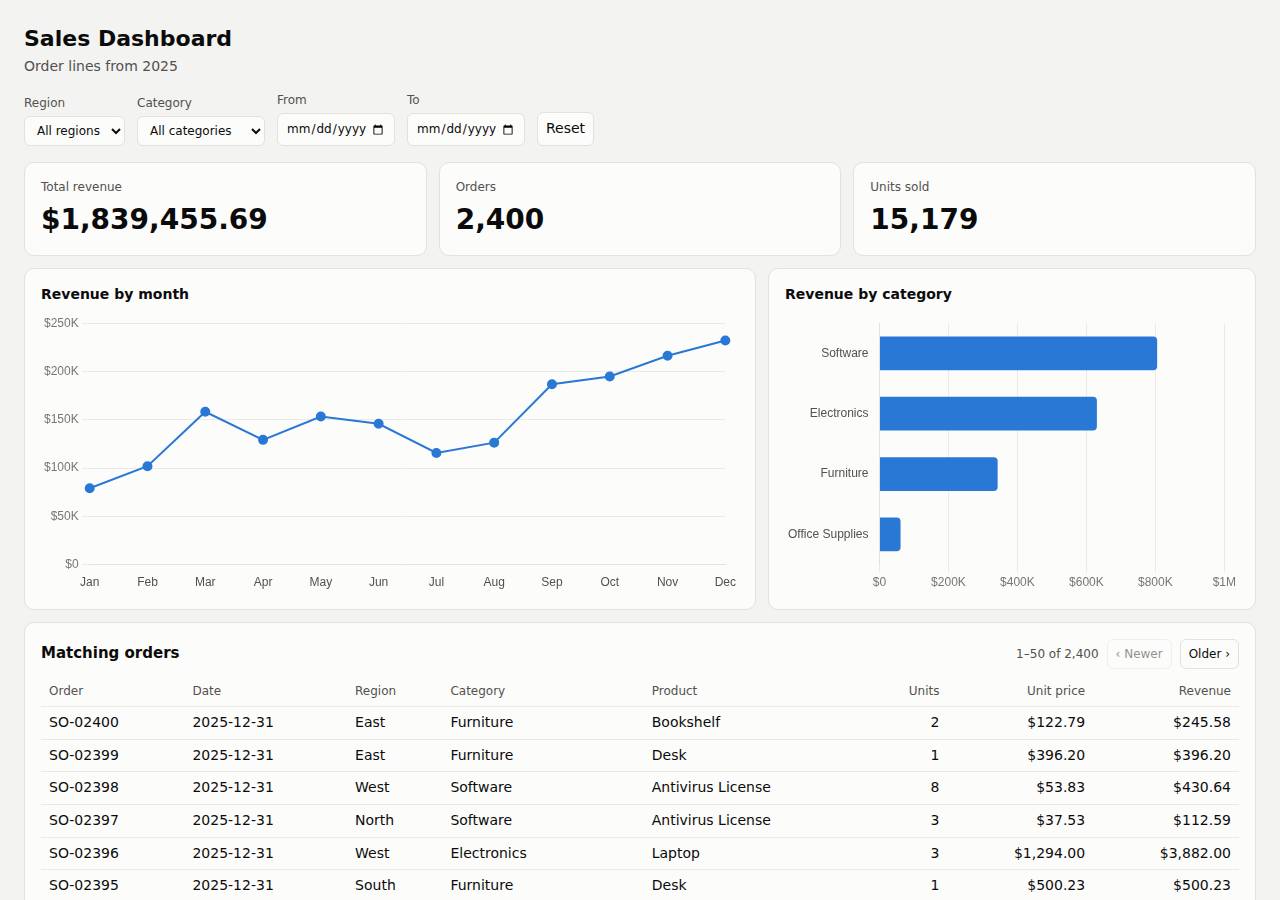
Deployed to https://adb-ankp0-dataviz-4fbum.ondigitalocean.app. Every deployment is deleted after it's verified and reviewed.
Screenshots
Technologies
- Runtime
- Node.js 20
- Frameworks
- Express
- Libraries
- Chart.js
- Packaging
- Docker (node:20-alpine)App spec (.do/app.yaml)
- Hosting
- App Platform service (apps-s-1vcpu-0.5gb)DigitalOcean Container Registry (starter)
Named from the app's dependencies, Dockerfile and config files, and the cloud resources it created.
Checks
Black-box checks against the live URL. A cell succeeds when every required check passes. The app's spec
| Result | Check | Details |
|---|---|---|
| passed | GET / answers 2xx within 1 min ready |
|
| passed | The app is served over HTTPS with a valid certificate https |
|
| passed | The app is public: no redirect to another host such as a login page public_access |
|
| passed | GET / serves the dashboard as HTML dashboard |
|
| passed | GET /api/summary (no filters) matches the dataset summary_all |
|
| passed | GET /api/summary (region=West) matches the dataset summary_region |
|
| passed | GET /api/summary (category=Electronics) matches the dataset summary_category |
|
| passed | GET /api/summary (region=East, category=Furniture, start=2025-03-01, end=2025-06-30) matches the dataset summary_combined |
|
| passed | GET /api/summary (region=Atlantis) matches the dataset summary_empty |
|
| passed | The dashboard renders a chart (SVG or canvas) in a browser browser_chart |
|
| passed | The dashboard shows at least two charts browser_two_charts optional |
|
| passed | The dashboard has filter controls browser_filters optional |
Human steps
- Sign up for an account and verify the email address · 3 min
prerequisite: account setup - Add a payment method to the account · 2 min
prerequisite: account setup - Create an API token and hand it to the agent · 2 min
prerequisite: account setup
Stack fit
The same review rated the stack the agent chose, judged against the app's requirements rather than a preferred stack.
Express with the data in memory, Chart.js served locally, and one App Platform service is a simple, well-reasoned stack for a small read-only dashboard. The one departure from STACK.md is a Dockerfile built locally and pushed to DOCR instead of an App Platform source build.
| Criterion | Weight | Score | Why |
|---|---|---|---|
| Fit for the job | 40 | 9/10 | Node/Express with the 2,400-row read-only CSV held in memory fits the task well: aggregation is trivial, the data never changes, and Chart.js covers the charts. Filtering is plain fetch calls with no realtime transport, which the task doesn't need. |
| Proportion | 30 | 9/10 | There are only two runtime dependencies and no database. STACK.md explicitly and soundly rules out a managed database. The only extra piece is a container registry the platform didn't strictly require. |
| Platform fit | 30 | 8/10 | A single App Platform web service on port 8080 with a health check suits a small dynamic API plus page. STACK.md planned to let App Platform build from source with the Node buildpack, but the agent instead built a Dockerfile locally and pushed it to DOCR, adding a registry and a less traceable build path. |
Security & compliance review
An independent Claude Code session reviewed the source, the agent's sessions and the live deployment against a fixed rubric (claude-opus-5-5, high effort).
The dashboard runs on a paid, always-on App Platform service with a private DOCR image. It needs no secrets, and no credentials leaked during build or deploy. HTTPS is enforced and nothing beyond the app is exposed. The main weaknesses are in the deployment: an unpinned node:20-alpine base image, deploying from a mutable :latest tag built on the agent's machine, a container that runs as root, and missing security headers.
| Criterion | Weight | Score | Why |
|---|---|---|---|
| Secrets handling | 25 | 10/10 | The app needs no runtime secrets. The DigitalOcean token came from the environment (or a git-ignored, docker-ignored .env), was never echoed in the transcripts, and is not in the source, image build context or deployed files. |
| Deployment provenance | 20 | 6/10 | The image was built on the agent's machine and pushed to the owner's private DOCR, so it does match the code that was built. But the base image is the floating tag node:20-alpine with no digest, and the app is deployed from the mutable :latest tag rather than a digest or an immutable tag. Dependencies are locked through npm ci, although package-lock.json is missing from the delivered sources. |
| Terms compliance | 15 | 9/10 | This is a commercial app on a paid, always-on App Platform Basic service ($5/mo) plus the free DOCR Starter tier. As far as I know, neither plan's terms forbid commercial use, and neither sleeps or expires. The only gap is that a single instance gives no redundancy. |
| Least privilege | 15 | 7/10 | There is no data store, the registry is private, and only one HTTP service is public. However, the container runs as root, because the Dockerfile has no USER directive and node:20-alpine defaults to root. |
| Transport security | 10 | 7/10 | HTTPS works with a valid platform certificate, and HTTP returns a 301 redirect to HTTPS. The app sets none of HSTS, X-Content-Type-Options, frame protection or CSP, which it could have done itself (for example with helmet). |
| Attack surface | 10 | 9/10 | Requests for source files, .env, .git, the Dockerfile, the CSV, node_modules and directory listings all return 404, and there are no stack traces. Small leaks: the X-Powered-By: Express header and Express's default error pages. |
| Application security | 5 | 8/10 | Output is rendered with textContent, so there is no XSS. Filters are exact-match comparisons against in-memory data, so there is nothing to inject into. Malformed dates get a 400 and the orders limit is capped at 500. Minor gaps: impossible dates such as 2025-02-31 are accepted, and nothing rate-limits the public API. |
Findings
-
medium deployment Deployed from mutable :latest tag with unpinned base image
Evidence: app/.do/app.yaml lines 5-9 (tag: latest); app/Dockerfile line 1 'FROM node:20-alpine'; scripts/deploy.sh builds and pushes registry.digitalocean.com/$REG/$REPO:latest
Fix: Pin the base image by digest (node:20-alpine@sha256:...). Tag each image with an immutable version (git SHA) or deploy by digest, and build from a version-controlled source (App Platform git source or CI).
-
medium deployment Container runs as root
Evidence: app/Dockerfile has no USER directive; node:20-alpine runs as root by default
Fix: Add 'USER node' (and copy files with --chown=node:node) so the server runs unprivileged.
-
low deployment Lock file not part of delivered sources
Evidence: Dockerfile runs 'npm ci --omit=dev' (needs package-lock.json, which appears in the build transcript's ls output), but app/ contains no package-lock.json; package.json uses caret ranges ^4.5.1 / ^4.22.3
Fix: Commit package-lock.json alongside the source so the dependency set used in production can be reproduced and audited.
-
low app Missing security headers
Evidence: curl -sI https://adb-ankp0-dataviz-4fbum.ondigitalocean.app/ returns no Strict-Transport-Security, X-Content-Type-Options, X-Frame-Options/frame-ancestors or Content-Security-Policy
Fix: Add helmet (or set the headers manually) with HSTS, nosniff, frame-ancestors 'none' and a strict CSP ('self' only, since Chart.js is served locally).
-
low app Framework fingerprinting via X-Powered-By
Evidence: Every response includes 'x-powered-by: Express'; unknown paths return Express's default 'Cannot GET /path' page
Fix: Call app.disable('x-powered-by') and add a minimal custom 404 handler.
-
low app Impossible calendar dates accepted
Evidence: GET /api/summary?start=2025-02-31 -> 200 (filtered from 2025-03). In lib/data.js parseFilters, the check is the regex plus Date.parse, which rolls over invalid days
Fix: Check that the parsed date round-trips (new Date(s).toISOString().slice(0,10) === s) and return 400 otherwise.
-
low app No rate limiting on public API
Evidence: server.js: /api/summary and /api/orders (up to 500 rows per request, e.g. GET /api/orders?limit=99999 -> 77 KB response) have no throttling
Fix: Add a lightweight per-IP limiter such as express-rate-limit, or rely on caching. The risk is low with in-memory data on one instance.
-
info platform HTTP redirects to HTTPS
Evidence: curl -sI http://adb-ankp0-dataviz-4fbum.ondigitalocean.app/ -> 301 Location: https://.../
Fix: None needed.
Cloud resources and cost
| Traffic | Per month | How it was priced |
|---|---|---|
| Light use Barely used: a few visits a week, about 2,000 requests a month. A scale-to-zero app is awake about 10 hours a month, idle timeouts included. | $5.00 | fixed monthly prices; 0.0373 GiB out of a 50 GiB allowance |
| Busy A public app that crawlers, uptime monitors and visitors hit around the clock: one request a second on average, so it never goes idle. | $5.00 | fixed monthly prices; 49 GiB out of a 50 GiB allowance |
Resources the agent created
| Kind | Name | Plan | List price / month | Pricing |
|---|---|---|---|---|
| app | adb-ankp0-dataviz | adb-ankp0-dataviz-web: apps-s-1vcpu-0.5gb x 1 | $5.00 | adb-ankp0-dataviz-web: apps-s-1vcpu-0.5gb x 1 |
| registry | adb-ankp0-dataviz | starter | $0.00 | Container Registry starter tier (one per account) |
The agent estimated $5.00 a month.
Code
- Code
- 501 lines in 16 files (JavaScript 319, HTML 60, Shell 59, CSS 55, JSON 28, Markdown 27, YAML 16, Docker 8)
- Dependencies
- 2 npm, 0 Python
- Deploy config
Dockerfile.dockerignore.do/app.yaml
The agent's sessions
| Phase | Status | Time | Turns | Tokens | Cost | Shell commands |
|---|---|---|---|---|---|---|
| Build | completed | 2m 53s | 18 | 692.2K | $0.56 | 14 |
| Deploy | completed | 1m 49s | 7 | 448.4K | $0.17 | 6 |
The agent's deploy summary
The dashboard is live at https://adb-ankp0-dataviz-4fbum.ondigitalocean.app, and every requirement in TASK.md works through that public URL.
What I deployed (about $5/month):
- App Platform app
adb-ankp0-dataviz(ID88ff4d9a-fe5c-4451-af62-4377e579adf5), with one web serviceadb-ankp0-dataviz-webon the $5 Basic plan (512 MB, one instance, New York). HTTPS uses DigitalOcean's certificate, and plain HTTP redirects to HTTPS. - Container registry
adb-ankp0-datavizon the free Starter tier, holding the imageadb-ankp0-dataviz-web:latest.
Tested through the public URL:
- Smoke test:
scripts/smoke.shpassed. It checks the dashboard page,/api/summarywith no filters, with combined filters (exact expected values) and with no matches (zeros and empty arrays), and the orders table. - Browser test: in headless Chrome, changing the region, category and start-date filters updated the revenue and order tiles, the charts and the table without reloading the page, with no console errors.
What didn't work at first: creating the app failed with "Image does not exist or is private", even though the push had succeeded. Naming the registry explicitly in .do/app.yaml fixed it, and the spec now includes it. human_steps is empty: the token you provided was enough, and I didn't create any new credentials, so there is no .env file.
To redeploy, run ./scripts/deploy.sh with DIGITALOCEAN_ACCESS_TOKEN set. With a single instance there is no redundancy if it goes down.
6 shell commands during deploy
- 3s
cd /home/runner/work/_temp/adb-ankp0-dataviz; which doctl || echo nodoctl; [ -n "$DIGITALOCEAN_ACCESS_TOKEN" ] && echo token-set; doctl account get --format Email,Status,DropletLimit 2>&1 | tail -1; d - 8s
cd /home/runner/work/_temp/adb-ankp0-dataviz; ./scripts/deploy.sh > /tmp/deploy.log 2>&1; echo exit=$?; grep -vE "^#|^ *[0-9a-f]{12}: " /tmp/deploy.log | tail -25 - 53s
cd /home/runner/work/_temp/adb-ankp0-dataviz; doctl registry repository list-v2; doctl registry repository list-tags adb-ankp0-dataviz-web - 57s
cd /home/runner/work/_temp/adb-ankp0-dataviz; sed -i 's# registry_type: DOCR# registry_type: DOCR\n registry: adb-ankp0-dataviz#' .do/app.yaml; cat .do/app.yaml | head -9; doctl apps sp - 1m 25s
cd /home/runner/work/_temp/adb-ankp0-dataviz; U=https://adb-ankp0-dataviz-4fbum.ondigitalocean.app; doctl apps get 88ff4d9a-fe5c-4451-af62-4377e579adf5 --format ActiveDeployment.Phase,Region --no-head - 1m 41s
cd /home/runner/work/_temp/adb-ankp0-dataviz
Raw data
Report on GitHub Full record (JSON) Workflow run, with transcripts